![O3DLogo.png]](https://info.odyssey3d.ca/hs-fs/hubfs/O3DLogo.png?height=40&name=O3DLogo.png)
Follow the steps below to make changes to your property website.
What information can I edit?
Through the Odyssey3D Client Portal, you can update various details associated with your property website, including:
- Property Title: Update the title displayed on your property website.
- Property Description: Add or revise your property's description.
- Property Type: Update the type of property being showcased.
- Listing Status: Change the property's listing status as needed.
These options allow you to manage important listing information without needing to contact our support team.
How do I edit my property details?
Step 1: Log in to your Client Portal (RELA)
Log in to your Odyssey3D Client Portal using your account credentials.
Once logged in, navigate to Manage → Properties using the menu on the left-hand side.
Select the property you'd like to update.
Step 2: Open Edit Property
Once you've selected the correct property, click Edit Property to open the dropdown menu.
Select Details.
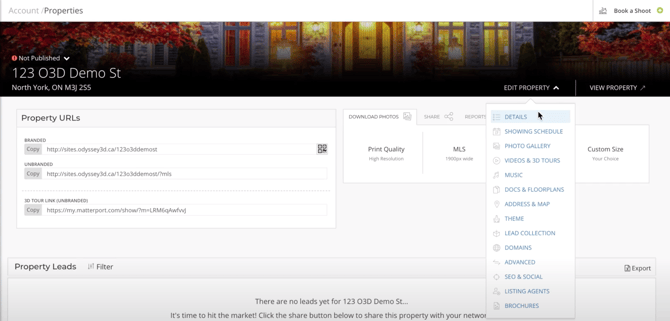
Step 3: Update your property information
Within the Details section, you'll find editable property information, such as:
- Property title
- Property description
- Property type
- Listing status
Click the information you'd like to change and enter your updated details.
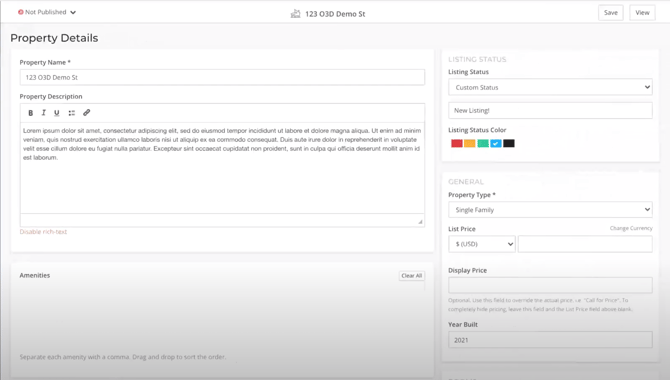
Step 4: Review your changes
Once you've finished editing, review the updated information and follow any on-screen instructions to save or confirm your changes.
We recommend checking your property website afterward to ensure everything displays as expected.
Can I change the appearance of my property website?
Absolutely! In addition to editing your property details, you can customize the layout and appearance of your property website by selecting a different theme.
For step-by-step instructions, visit:
How Do I Change the Layout of My Property Website?
Will changes to my property website update my MLS listing?
Changes made through the RELA Client Portal are intended to update your Odyssey3D property website.
If you also need to change information in your MLS listing, please verify or make those changes through your MLS system separately.
Can Odyssey3D make the changes for me?
If you're short on time or prefer to have our team handle the updates, we're happy to help.
Email: support@odyssey3d.ca
Phone: 416-884-2167
Please include your property address and a brief description of the issue so we can assist you.